

How To Hack Windows Password With Kali Linux
Reset Windows ten Local Password with Kali Linux Live USB
Can't access your computer because of forgetting Windows 10 password? Compared to offline local account, Microsoft online account makes it super easy to reset your password to regain admission to your computer. If you lost a local administrator password, you lot have to apply third-party bootable media. In this tutorial nosotros'll show you how to reset lost Windows 10 local password with Kali Linux.
Brand a Kali Bootable USB Bulldoze
When y'all're locked out of Windows ten, yous need to use another PC to make a Kali bootable USB bulldoze. Delight follow the steps listed below.
- Download the ISO image of Kali Linux (formerly known as BackTrack). Information technology's complimentary.
- Next, you'll need a plan to install Kali on your USB drive and go far bootable. Here we'll employ the freeware ISO2Disc. Only download and install it on your local PC.
-
Start the ISO2Disc utility. Click Browse to locate your Kali Linux image.
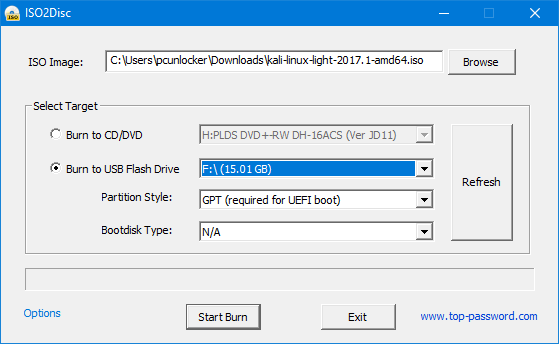
- Choose the Burn to USB Flash Bulldoze pick and select the drive letter for your USB drive. Click Start Burn down to create a Kali Live USB drive.
Kick with Kali Linux USB
Once you have a Kali Alive USB, plug it into the USB port of your Windows ten computer and boot from the USB. Yous may have to press a special cardinal (e.thousand., Esc, F2, F12, Del, etc.) during bootup to get the computer to boot from the USB instead of its internal hard drive.
Reset Windows 10 Local Password
-
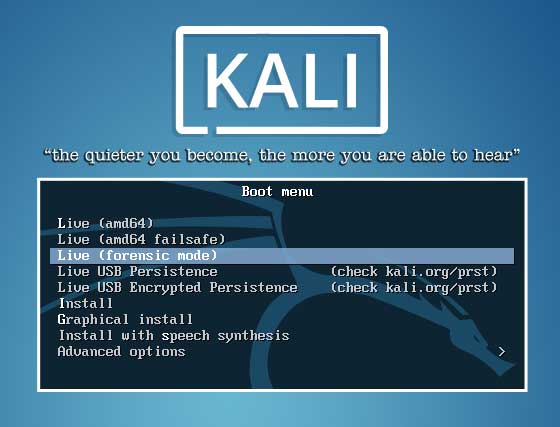
After booting from USB, you will see Kali Linux Kicking Carte du jour. Choose the tertiary option which is Alive (forensic way).
-
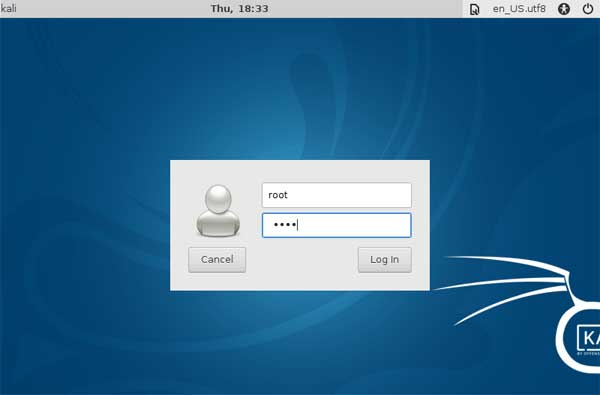
Enter the default username as root and password as toor when prompted.
-
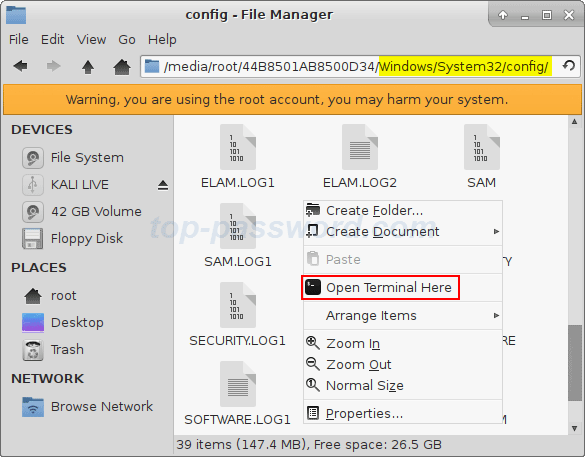
Open File Director and navigate to the directory where the SAM is saved. This file is ordinarily located in /Windows/System32/Config. Right-click a blank space in File Manager, and select Open Terminal Here.
-
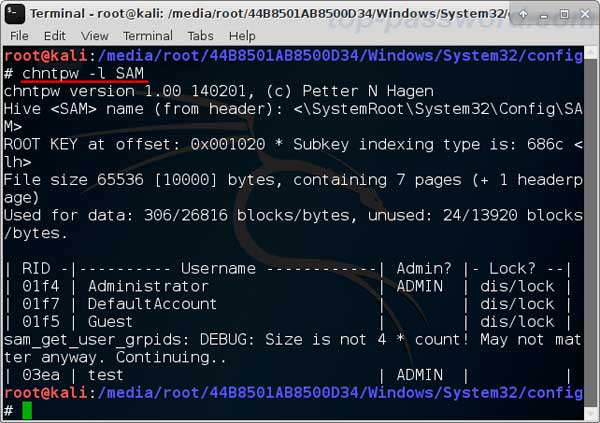
Type the command: chntpw -fifty SAM. It shows the list of usernames found in the SAM on your Windows 10 Bone.
-
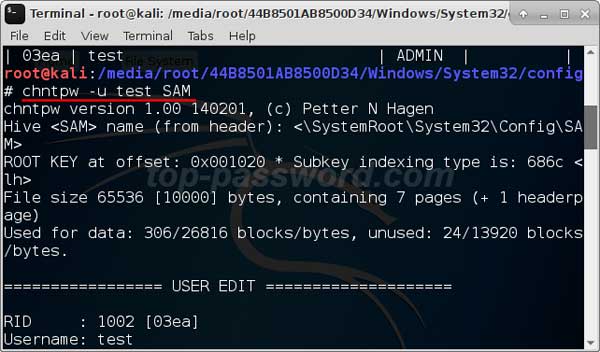
Simply run the chntpw -u username SAM control to reset your lost password. Notation: where username is the name of your actual Windows account. For instance, my username is test, I should type chntpw -u test SAM after that hit Enter.
-
Press one for immigration the previously set Windows password.
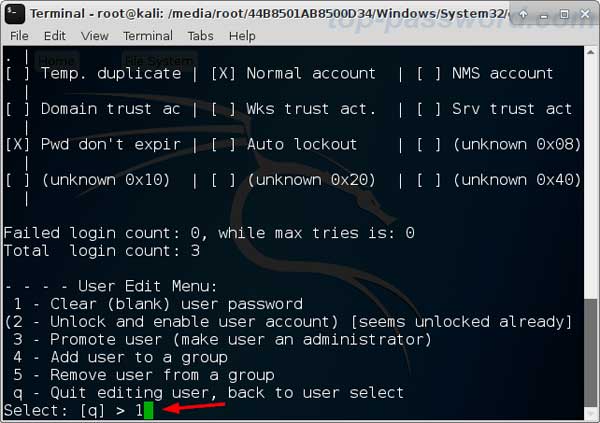
- Printing y when asked if you desire to save the changes to the SAM hive. Now, Reboot your computer and unplug the USB bulldoze, you will encounter Window 10 automatically login without password.
Note that Kali Live USB tin can reset the password of local account only (not Microsoft business relationship). If you demand an easier and more powerful tool to reset forgotten Windows 10 password, y'all can try this dedicated password recovery utility - PCUnlocker.
Related Articles

Source: https://www.top-password.com/knowledge/reset-windows-10-password-with-kali-linux.html
Posted by: solisdonve1972.blogspot.com
0 Response to "How To Hack Windows Password With Kali Linux"
Post a Comment